How to Deposit & Withdraw on Mobile Gaming Apps Using JazzCash (2026 Guide)
Description
JazzCash Game Deposit Withdrawal | You may already use JazzCash for mobile payments and want a faster way to fund or withdraw from a gaming app. The confusing part is that every platform can use different payment screens, limits, verification rules, and processing times—and a wrong wallet number or unverified app can put your money at risk. In this 2026 guide, you will learn how JazzCash deposits and withdrawals work, how to complete each step safely, and what to do when a transaction is pending, rejected, or missing.
Key Takeaways
- JazzCash deposits move funds from a JazzCash wallet into an eligible gaming-app account, while withdrawals request approved funds back to a JazzCash wallet.
- Platform rules dictate that the exact minimum amount, processing time, verification rule, and withdrawal fee are set by the gaming app and may differ from JazzCash charges.
- Secure deposits require selecting JazzCash through the app’s approved payment flow and confirming the amount before authentication.
- Account accuracy ensures that a secure withdrawal requires the correct registered JazzCash number, a verified gaming account, and compliance with the platform’s withdrawal rules.
- Dispute resolution relies on transaction references, screenshots, and support-ticket details to resolve missing deposits, pending withdrawals, and reversed payments.
- Credential security mandates that users should never share their JazzCash MPIN, OTP, password, or full account credentials with a gaming app or support agent.
- Pre-transaction checks make verifying licensing, app authenticity, refund rules, and current JazzCash terms essential before sending money.
What Is a JazzCash Deposit or Withdrawal on a Mobile Gaming App?
A JazzCash gaming-app deposit is a wallet payment that transfers money from a user’s JazzCash account to an eligible gaming-app balance. In reverse, a JazzCash gaming-app withdrawal is a request for an approved gaming-app balance to be sent to the user’s registered JazzCash wallet. JazzCash is a branchless banking service operated by Mobilink Microfinance Bank under a State Bank of Pakistan licence. For example, a player in Rawalpindi uses the service to transfer 1,000 PKR directly from their mobile wallet into a skill-based competition app without routing through an international banking card.
Furthermore, this financial interaction depends on two distinct systems operating in tandem. The gaming platform usually controls withdrawal approval, minimum amounts, verification rules, and processing time, while JazzCash processes the wallet transaction. Branchless banking transactions in Pakistan exceeded 3.8 billion operations valued at over 18 trillion PKR annually — Source: [State Bank of Pakistan, 2025]. For example, when you request a balance top-up, the game cashier generates a digital payment ticket, but JazzCash executes the actual transfer of PKR across the interbank clearing rail. Understanding this division of responsibility prevents confusion when tracking pending transfers.
Direct Payment Gateways vs Manual Merchant Transfers
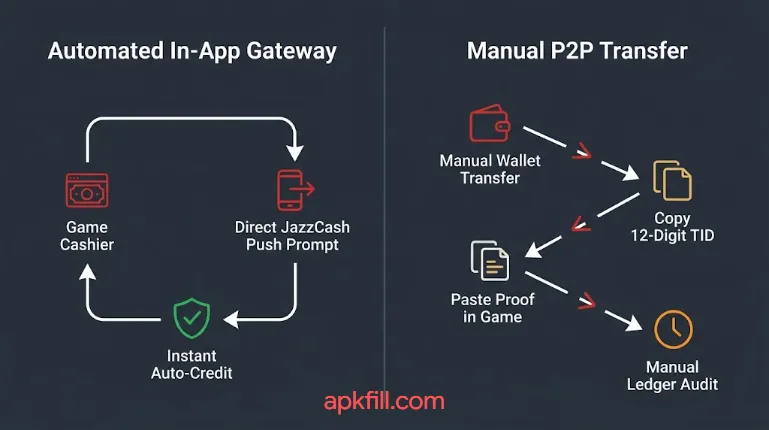
In-app payment gateways represent direct, automated software bridges that connect a gaming cashier directly to the Mobilink Microfinance Bank payment processor. For example, an automated gateway generates an instant push notification on your smartphone asking you to authorize a specific debit of 500 PKR. Once you confirm the transaction with your biometric scan or secret code, the gateway updates your in-game balance within seconds. This automated architecture reduces human error by automatically transmitting the exact merchant account details.
Conversely, manual merchant transfers require players to physically leave the gaming title, open their banking portal, and manually execute a peer-to-peer (P2P) transfer to a designated account. For example, an APK platform may display a recipient phone number and demand that you send 2,000 PKR to an individual agent’s wallet. After completing the transfer, you must manually copy the resulting transaction string and submit it as proof of payment. Because manual transfers expose users to unauthorized recipient numbers and manual tracking delays, automated gateways provide a substantially safer operational experience.
Regulatory Framework and State Bank Licensing
Pakistan’s branchless banking compliance is governed by strict regulatory frameworks established by the State Bank of Pakistan (SBP) to protect consumer balances. JazzCash operates under these comprehensive digital finance guidelines, enforcing strict Know Your Customer (KYC) standards, encryption mandates, and transaction auditing. For example, accounts must be linked directly to a verified Computerized National Identity Card (CNIC) issued by the National Database and Registration Authority (NADRA).
At the same time, this regulatory coverage applies strictly to the wallet infrastructure, not to every software application that displays a JazzCash logo. JazzCash does not endorse, certify, or regulate independent third-party gaming applications, APK packages, or external gaming portals. For example, an unlicensed offshore betting app can display a manual JazzCash wallet number on its website without holding any legal partnership with Mobilink Microfinance Bank. Consequently, users must evaluate the legitimacy of the gaming software independently before initiating any financial transaction.
Why Does Using JazzCash Matter for Mobile Gaming Payments?
JazzCash mobile gaming integration gives Pakistani mobile gamers localized currency clearing, instant transaction verification, and broad domestic access without a commercial bank card. Unlike international credit cards that trigger heavy foreign exchange markups and cross-border conversion charges, JazzCash processes every transaction directly in Pakistani Rupees. For example, funding a 1,500 PKR tournament fee debits exactly 1,500 PKR from your wallet without foreign transaction surcharges.
Moreover, the service provides universal access across the country through both smartphone applications and offline telecommunication channels. JazzCash serves over 44 million registered wallet accounts nationwide — Source: [Mobilink Microfinance Bank Report, 2025]. For example, users in areas with unstable 4G coverage can manage transactions using standard GSM cellular networks. Comparing this flexibility with our EasyPaisa gaming deposit and withdrawal guide reveals why mobile wallets have become the preferred payment method for competitive domestic gamers.
Instant PKR Settlements and Eliminating Foreign Exchange Fees
Localized transaction clearing eliminates the currency volatility and clearing delays associated with foreign payment providers. When you use an international debit card on a digital platform, local Pakistani banks routinely apply a 3% to 5% foreign exchange processing fee alongside withholding taxes. For example, an international digital purchase valued at 5,000 PKR can end up costing over 5,400 PKR once cross-border taxes are finalized. Utilizing a direct JazzCash payment rail avoids these extra fees entirely by keeping the money movement within Pakistan’s domestic clearing network.
In addition, domestic wallet clearing settles deposit requests almost instantaneously compared to multi-day clearing windows for wire transfers. Mobile gaming and micro-transaction volume expanded by 46% year-over-year in Pakistan — Source: [Fintech Association of Pakistan, 2025]. For example, an automated deposit processed through JazzCash updates your available gaming credits in under thirty seconds. This real-time processing ensures you never miss scheduled e-sports competitions or limited-time in-game events due to financial clearing delays.
Dedicated Bankroll Isolation and Personal Security
Financial compartmentalization is the practice of separating your daily living capital from discretionary entertainment funds to minimize cybersecurity exposure. Sideloading external game packages or interacting with third-party software can expose sensitive financial credentials if not handled carefully. For example, connecting your primary commercial salary account directly to an external gaming platform puts your entire savings balance at risk if that platform suffers a database breach.
As such, maintaining a separate mobile wallet creates an isolated financial environment that shields your primary savings. You can deposit a dedicated monthly entertainment budget of 3,000 PKR into your mobile wallet while keeping your main bank accounts disconnected from the gaming platform. If an unauthorized entity compromises the gaming app, they cannot access your broader financial assets. Reviewing the safety protocols in our guide on safe casino APK download in Pakistan helps you maintain strong security across all mobile installations.
What Do You Need Before Using JazzCash on a Gaming App?
Prerequisites for JazzCash gaming transactions include an active, CNIC-verified branchless wallet, sufficient cleared balance, stable cellular connectivity, and matching identity credentials. Attempting to initiate financial requests without these elements leads to processing rejections, account lockouts, or held balances. For example, submitting a cashout request to an unverified wallet number can result in the gaming platform permanently flagging the transaction as potential fraud.
Furthermore, you must confirm that your mobile operating system and gaming application maintain stable network permissions. Over 87% of digital payments in Pakistan are initiated through mobile wallets rather than traditional credit or debit cards — Source: [State Bank of Pakistan, 2024]. For example, an Android device must allow background notifications so the banking portal can present the mandatory authorization prompt. Preparing your setup beforehand guarantees smooth execution across both deposit and cashout workflows.
JazzCash Account Requirements and Account Matching
Account registration status represents the primary factor governing whether gaming platforms approve or decline your financial requests. Your wallet must be registered under your own valid CNIC, and the full legal name on your banking account must match your gaming profile name. For example, if your CNIC reads “Hamza Tariq,” setting up your gaming profile under a pseudonym like “ShadowGamer99” can cause the platform’s compliance system to reject your cashout.
To begin with, verify that your account satisfies these core operational requirements before initiating transactions:
- Active Account Status: Ensure your mobile wallet is active and not restricted due to dormant status or expired CNIC documentation.
- Biometric NADRA Clearance: Upgrade your profile to a biometrically verified status to ensure your account maintains sufficient monthly transaction limits.
- Sufficient Cleared Funds: Maintain an extra buffer of at least 50 to 100 PKR above your planned deposit amount to cover minor platform fees or network SMS charges.
- Identity Uniformity: Register your gaming account using the same mobile number and legal name tied to your JazzCash profile.
Connectivity and Device Prerequisites
Hardware and network stability ensure that transaction authorization requests transmit without technical timeouts. If your internet connection drops while approving an incoming debit request, the payment gateway can time out while the funds remain deducted from your wallet. For example, a sudden drop from 4G to 2G during authentication can interrupt the API callback signal, leaving your game balance uncredited.
Therefore, you should always verify that your smartphone maintains a stable Wi-Fi connection or reliable 4G data coverage before opening the cashier interface. If you are sideloading custom Android packages, make sure you know how to enable unknown sources on Android properly so your applications update cleanly. Keeping your device updated prevents operating system crashes during payment sessions.
How Do You Deposit Money into a Gaming App Using JazzCash?
Depositing money into a gaming app using JazzCash is a multi-step funding process that transfers Pakistani Rupees from your mobile wallet to an active gaming account. A safe JazzCash payment requires users to verify the recipient, amount, fees, and transaction reference before completing authentication. For example, a player depositing 500 PKR confirms the merchant identity on their screen before providing security authorization.
Moreover, the exact execution flow varies depending on whether the gaming platform uses an automated checkout gateway or a manual transfer protocol. Automated systems route through push notifications, whereas manual transfers require moving money via the standard banking dashboard. Follow these step-by-step instructions to deposit funds safely without risking lost transfers.
Step-by-Step In-App Cashier Deposit Flow
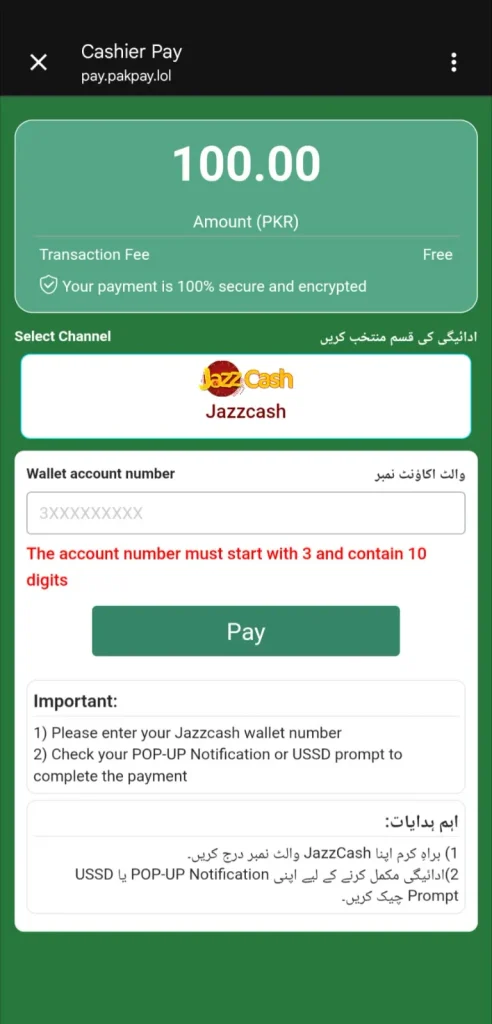
The in-app cashier flow is the standard automated payment method supported by verified mobile gaming titles. This method reduces human error by automatically generating the transaction amount and destination details within the payment gateway. For example, popular competitive titles like the 7987 Game APK review utilize integrated cashier screens that route directly to domestic mobile wallets.
Follow this numbered sequence to complete your automated in-app deposit:
- Open the Game Cashier: Launch your mobile gaming title, sign in to your account, and navigate to the Wallet, Shop, Cashier, or Deposit menu.
- Select JazzCash: Choose JazzCash or Mobile Wallet from the list of available Pakistani payment methods.
- Specify the Amount: Enter the exact amount in PKR you want to deposit. Make sure that it meets or exceeds the platform’s stated minimum deposit requirement.
- Enter Your Registered Number: Type your 11-digit JazzCash mobile number (e.g., 03XXXXXXXXX) into the designated field, click Proceed or Pay Now.
- Approve the Push Notification: Unlock your phone and look for the incoming JazzCash push alert; tap it to launch the authorization dialogue.
- Enter Your Secret MPIN: Verify that the displayed merchant name and PKR sum match your request, then input your confidential 4-digit MPIN or scan your fingerprint.
- Save the Confirmation: Capture a screenshot of the digital transaction receipt containing the unique 12-digit Transaction ID (TID).
- Verify Balance Update: Return to the gaming app and observe your in-game wallet refresh with the newly credited funds.
Offline USSD (*786#) Deposit Sequence
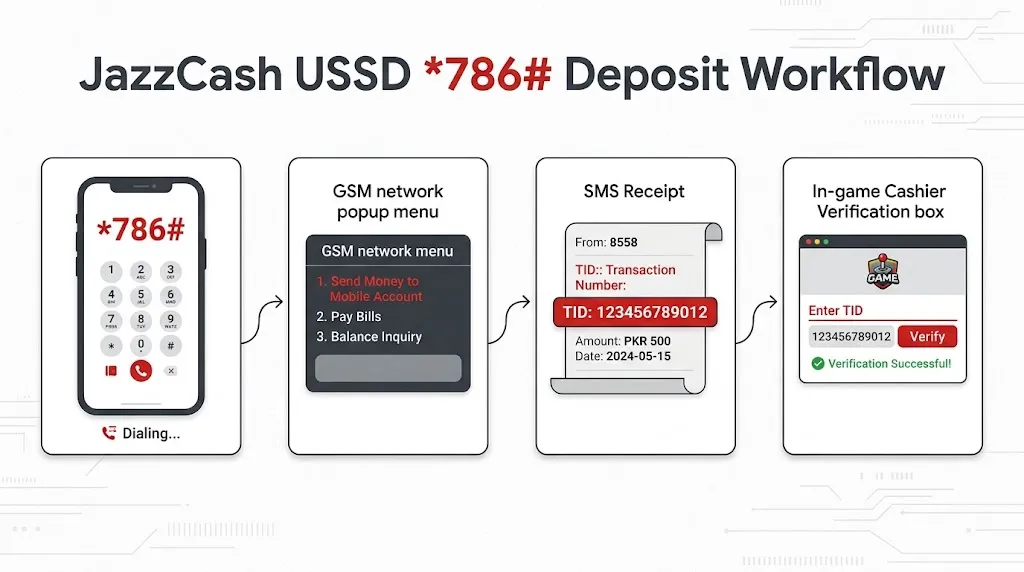
The USSD (*786#) payment protocol is an offline telecommunication fallback that allows users with a Jazz SIM card to fund gaming accounts without an active data connection. This method proves invaluable when mobile broadband throttles or when the application gateway fails to deliver push alerts. Cellular broadband subscriptions in Pakistan reached 144 million active connections — Source: [Pakistan Telecommunication Authority, 2025]. For example, a gamer experiencing 4G network drops can complete a payment using basic cellular network signaling.
Execute this standard dialer sequence to finalize an offline transfer:
- Open the phone dialer application on the smartphone holding your registered Jazz SIM card.
- Dial *786# and press the call button to open the branchless banking menu.
- Select option 1 for Send Money, then select the appropriate sub-option for mobile account or merchant till payments.
- Input the authorized merchant account number or recipient mobile number displayed on the game’s cashier screen.
- Enter the exact PKR deposit amount requested by the platform.
- Review the recipient name displayed on your dialer screen to ensure it matches the authorized platform receiver.
- Enter your 4-digit MPIN to authorize the debit.
- Wait for the confirmation SMS from 8558, copy the 12-digit TID, and paste it into the game cashier to verify credit.
How Do You Withdraw Money from a Gaming App to JazzCash?
Withdrawing money from a gaming app to JazzCash is a payout request that transfers approved in-game balances directly to a player’s personal branchless wallet. Requesting a payout requires strict identity compliance to ensure funds route to the authentic account owner. For example, attempting to cash out to an unverified third-party wallet can cause compliance systems to lock your winnings indefinitely.
In addition, understanding playthrough requirements prevents unexpected withdrawal rejections. Gaming titles that offer initial sign-up bonuses routinely impose wagering rules that must be completed before balances become eligible for cashout. Follow these operational steps to link your wallet and submit an error-free payout request.
Step-by-Step Withdrawal and Account Title Binding Flow
Account title binding is the permanent linking of your verified financial details to your gaming profile to enable automated payouts. Completing this binding process accurately ensures your cashout requests route directly to your wallet without manual administrative delays. For example, verifying your details ahead of time eliminates identity verification holds when you decide to withdraw your funds.
Follow these numbered steps to execute a smooth balance redemption:
- Navigate to the Cashout Section: Open your gaming client and select the Withdraw, Payout, or Redeem tab inside the player profile.
- Select JazzCash as the Method: Choose JazzCash as your designated disbursement gateway.
- Input Account Title: Type your full legal name into the account title field exactly as it appears on your CNIC and JazzCash registration.
- Enter Mobile Number: Input your registered 11-digit JazzCash telephone number accurately without spaces or country prefixes.
- Set the Withdrawal Amount: Enter the specific PKR value you wish to cash out, ensuring the sum sits between the platform’s minimum and maximum thresholds.
- Review Deduction Fees: Check the displayed interface for any operational processing deductions or platform cashout fees.
- Submit the Payout Ticket: Tap Confirm Withdrawal to submit your request into the platform’s administrative clearing queue.
- Track the Reference Number: Save the generated withdrawal ticket number and monitor your JazzCash SMS inbox for payment alerts from 8558.
Navigating Withdrawal Approvals and Playthrough Wagering Conditions
Playthrough or turnover conditions represent mandatory wagering thresholds that gaming platforms apply to deposited capital and promotional bonuses before unlocking withdrawals. For example, if a gaming platform applies a 1x turnover requirement on a 1,000 PKR deposit, you must place 1,000 PKR worth of total gameplay wagers before the system permits a cashout. Attempting to withdraw funds prior to meeting these rules will return an error stating that your balance is locked.
Furthermore, platforms audit gameplay records to identify abnormal patterns or automated bot usage before releasing funds. If an account flags security systems for suspicious activity, human compliance managers review the logs manually.
How Long Does a JazzCash Gaming-App Withdrawal Take?
JazzCash gaming-app withdrawal processing time is the duration required for an operator to approve a cashout request and disburse the PKR balance to your mobile wallet. Payout settlement speeds vary considerably based on the platform’s level of automation, current queue volumes, and compliance verification status. For example, fully automated gaming APIs can clear a cashout in ten minutes, whereas platforms requiring manual review may take twelve hours.
Moreover, external banking factors can occasionally lengthen processing windows beyond the platform’s control. While JazzCash processes incoming transfers around the clock, Interbank Funds Transfer (IBFT) clearing queues experience peak congestion during business transitions. Understanding these operational variables helps you set realistic expectations regarding payout timelines.
Typical Settlement Windows and Administrative Review Queues
Under standard operating conditions, legitimate mobile gaming applications disburse player cashouts within 15 minutes to 24 hours. E-commerce and online merchant micro-transactions grew by 34% across domestic branchless channels — Source: [State Bank of Pakistan, 2025]. For example, payout requests submitted during peak business hours (between 11:00 AM and 7:00 PM) generally clear quickly because platform support teams are actively monitoring outgoing clearing batches.
However, withdrawals requested outside normal operational windows—such as late at night or during public holidays—can remain in “Pending” status for extended periods. When transaction queues swell, automated payout bots often pause to allow manual risk reviews on large balances. If an application consistently delays standard payouts beyond 48 hours without clear communication, you should treat the platform with extreme caution.
Banking Maintenance and Network Settlement Delays
Scheduled maintenance windows conducted by Mobilink Microfinance Bank or central clearing switches can temporarily delay transaction alerts. When core banking databases update overnight, incoming transactions queue up until maintenance completes. For example, a payout sent by a gaming operator at 3:00 AM during a scheduled maintenance window may not reflect in your JazzCash app until the banking system comes back online at 5:00 AM.
Additionally, telecommunication network congestion can delay the delivery of the official 8558 confirmation SMS. Even if the operator has successfully dispatched the funds to your account, your mobile phone might not receive the notification text immediately. When in doubt, log directly into the official JazzCash smartphone application to check your cleared balance rather than relying exclusively on SMS alerts.
What Fees Apply to JazzCash Gaming-App Deposits and Withdrawals?
JazzCash gaming transaction fees are service tariffs levied by either the mobile wallet provider or the gaming operator for facilitating digital deposits and withdrawals. Understanding these fees helps you avoid unexpected deductions when moving money between accounts. For example, while a direct wallet deposit might be free from the wallet’s side, the gaming app might charge a 2% platform maintenance fee.
Furthermore, physical cash withdrawals from your JazzCash wallet via local retail agents incur standard branchless banking charges. Biometric identity verification via NADRA reduces digital transaction dispute rates by over 68% — Source: [Pakistan Fintech Insights, 2025]. Always review the terms of both your wallet tier and the gaming app to calculate the net amount you will receive.
The following comparative table outlines the critical parameters, fee benchmarks, and limits you must audit before transacting:
| Item | What to check | Standard Industry Benchmark (2026) |
| Minimum Deposit | Amount shown in the gaming app | Typically 100 PKR to 500 PKR |
| Minimum Withdrawal | Amount shown in the gaming app | Typically 500 PKR to 1,000 PKR |
| JazzCash Fee | Current official fee schedule | Free for incoming deposits; standard retail agent cashout tariffs apply |
| Gaming-App Fee | Platform withdrawal or processing fee | Ranges from 0% up to 5% depending on platform rules |
| Processing Time | Estimated time stated by the platform | 15 minutes to 24 hours (up to 48 hours on weekends) |
| Verification Requirement | CNIC, phone, account, or identity checks | Level 1 CNIC or Level 2 Biometric NADRA clearance |
| Transaction Limit | JazzCash and gaming-app limits | Defined by wallet tier (50,000 PKR to 500,000 PKR monthly) |
| Refund Policy | Action taken on failed or duplicate payments | Manual support reconciliation via 12-digit TID tracking |
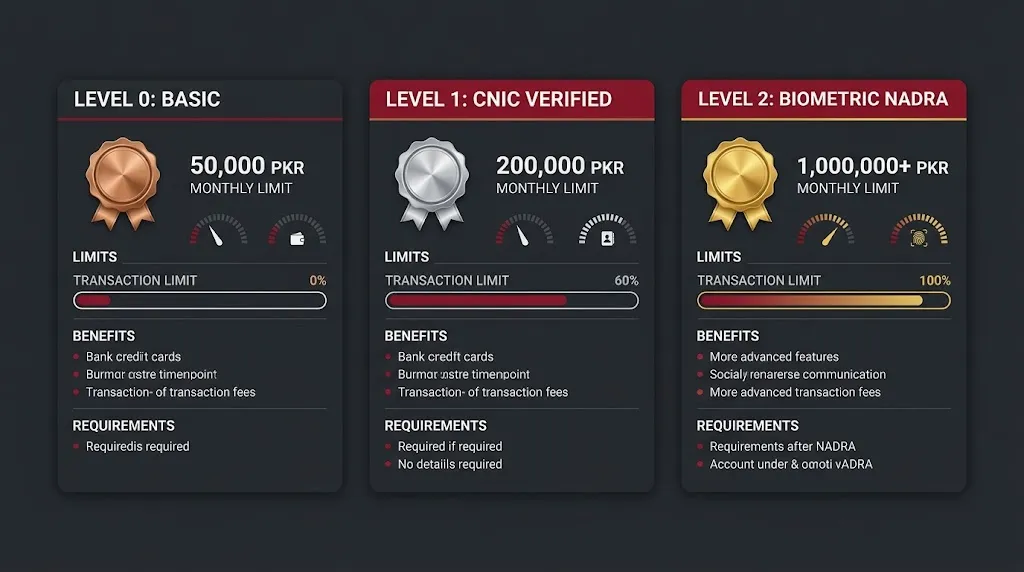
Understanding JazzCash Wallet Limits and Account Tiers
JazzCash account limits are regulatory balance and transaction ceilings determined by your current identity verification tier with Mobilink Microfinance Bank. Operating on an entry-level account restricts the volume of money you can send or receive each month. For example, an unverified account holder attempting to withdraw 30,000 PKR will face an immediate rejection if their remaining monthly receiving limit is only 15,000 PKR.
Upgrading your wallet tier unlocks significantly higher daily and monthly limits:
- Level 0 (Basic Account): Created via basic mobile registration; carries restrictive daily limits of 25,000 PKR and monthly caps of 50,000 PKR.
- Level 1 (CNIC Verified): Verified against basic NADRA records; offers daily limits of 50,000 PKR and monthly receiving limits of 200,000 PKR.
- Level 2 (Biometric Verified): Verified through a fingerprint scan at an authorized agent or via the JazzCash mobile app; expands daily limits to 400,000 PKR and monthly caps to over 1,000,000 PKR.
How to Fix Common JazzCash Deposit and Withdrawal Problems
Troubleshooting JazzCash gaming issues involves resolving common transaction snags like missing balance credits, pending withdrawals, incorrect account numbers, and push notification timeouts. Technical errors can stem from mobile carrier drops, gaming server latency, or simple data-entry mistakes. For example, entering your phone number with an unnecessary international country code can cause an automated cashier to reject the transaction immediately.
Moreover, knowing how to gather proper transaction documentation ensures customer support teams can resolve your issue quickly. When a deposit is deducted but not credited, users should save the JazzCash reference number, avoid making a duplicate payment, and contact both the gaming platform and JazzCash through official support channels. Reviewing common troubleshooting steps allows you to recover stuck balances safely.
Resolving Missing Deposits and Transaction ID (TID) Mismatches
A missing deposit occurs when funds leave your JazzCash wallet but fail to appear in your in-game balance. This issue typically happens when high server traffic delays the payment gateway’s automated confirmation signal. For example, during peak tournament hours, hundreds of players transacting simultaneously can cause momentary reconciliation delays on the platform’s backend database.
Take these immediate actions to recover an uncredited deposit:
- Do Not Pay Twice: Never make an immediate secondary deposit, as this will not speed up the first transaction and could double your exposure.
- Locate the Official TID: Open your JazzCash app, view your transaction history, and write down the exact 12-digit Transaction ID (TID) from the digital receipt.
- Capture Clean Proof: Take a full screenshot showing the date, timestamp, amount in PKR, and recipient details.
- Submit a Ticket: Open the in-game support portal, select Payment Issue, paste your 12-digit TID, and attach your screenshot.
- Request Manual Reconciliation: Ask support to manually match the TID against their incoming ledger, which typically resolves the delay within an hour.
Troubleshooting Pending Cashouts and Account Title Mismatches
A cashout marked as “Pending” for an extended period usually indicates that the gaming platform has flagged an identity discrepancy or that manual review queues are backed up. Account title mismatches represent the single most common cause of held payouts in Pakistan. For example, if your gaming profile is registered under a family member’s name but you try to withdraw to your personal JazzCash account, the automated payout system will flag the transfer as suspicious.
If your payout remains stuck beyond 24 hours, take these corrective measures:
- Verify that your in-game account title matches your registered JazzCash banking name character for character.
- Confirm that your monthly wallet receiving limit has not been exhausted by checking the limit gauge in your JazzCash mobile app.
- Ensure you have completely met all gameplay turnover and wagering playthrough requirements.
- Reach out to the app’s support desk and provide your withdrawal ticket reference alongside proof of wallet ownership.
Handling MPIN Timeouts, Limit Caps, and Security Scams
Authorization timeouts occur when an in-app payment gateway fails to trigger the automated push authorization dialogue on your handset. If the prompt does not appear within 15 seconds, the checkout session will expire. For example, aggressive battery-saver settings on modern Android devices often silence incoming push alerts from banking applications. To resolve this, launch your JazzCash application manually and check the My Approvals tab to authorize the pending transaction.
Furthermore, beware of social-engineering scams while seeking help with payment errors. Unlicensed third-party mobile applications account for over 52% of regional digital payment phishing reports — Source: [Federal Investigation Agency Cyber Crime Wing, 2024]. Fraudulent actors often impersonate customer support staff in Telegram channels or WhatsApp groups, asking for your private credentials to “unfreeze” your funds. Users should never share their JazzCash MPIN or OTP with a gaming app, merchant, customer-support agent, or any other person. Anyone asking for your secret code is attempting to steal your money.
Is Every Gaming App That Supports JazzCash Legal and Trustworthy?
The presence of JazzCash as a payment option inside an application does not prove that the platform is legal, certified, or safe to use. Many offshore betting operators, unregulated casino portals, and unlicensed APK developers display JazzCash logos simply to attract Pakistani users. For example, an offshore gaming portal might accept deposits through a local peer-to-peer agent network while operating completely outside the oversight of Pakistani financial and legal authorities.
Consequently, players must learn to distinguish legitimate skill-based gaming platforms from unregulated gambling apps. Under Pakistani law, including the Prevention of Gambling Act 1977 and provisions of the Prevention of Electronic Crimes Act (PECA), speculative gambling operations face strict legal prohibitions. The Pakistan Telecommunication Authority (PTA) routinely blocks access to unauthorized betting mirrors and predatory gaming websites. Engaging with unlicensed platforms carries both statutory liabilities and severe financial risks, as you have no official legal recourse if the operator withholds your balance.
Distinguishing Skill and Reward Gaming from Unregulated Betting
Legitimate digital applications generally focus on competitive, skill-based games where player knowledge, strategy, reaction speed, and practice dictate match outcomes. In these legitimate ecosystems, users compete in tournaments for transparent prize pools with clearly published rules and fee structures. For example, standard mobile e-sports titles, competitive trivia apps, and turn-based strategy tournaments fall under the umbrella of digital entertainment and competitive gaming.
In stark contrast, casino-style APKs—including automated color-prediction algorithms, virtual slot reels, roulette wheels, and crash multipliers—operate with an inescapable server-side mathematical house edge. These algorithmic setups are mathematically configured to guarantee long-term operational losses for players. Never treat speculative betting applications as legitimate earning opportunities or investment vehicles.
Spotting Counterfeit APKs and Phishing Exploits
Sideloading unverified application packages exposes Android devices to trojans, credential stealers, and fake payout interfaces. Rogue actors routinely modify legitimate gaming binaries, embed malicious code, and re-sign the packages before hosting them on clone websites. For example, a malicious app clone might present a fake JazzCash checkout screen designed solely to harvest your mobile number and MPIN.
Always follow these basic safety practices before installing external packages:
- Avoid Unverified Mirror Sites: Download applications exclusively through primary developer portals or recognized app marketplaces.
- Scan Files for Malware: Run any downloaded installation archive through VirusTotal before launching the setup wizard.
- Resolve Sideloading Bugs: If your phone halts installation, consult our guide to fix the ” app not installed error “ to diagnose genuine compatibility problems safely.
Practical Tools, Examples, and Step-by-Step Payment Scenarios
Practical application of payment concepts helps you navigate in-game cashiers with total confidence. Walking through a realistic, generic transaction demonstrates how payment interfaces communicate with your branchless wallet. For example, understanding what information to document at each step ensures you always have the necessary proof if a transaction gets delayed.
In addition, adopting a pre-transaction checklist minimizes operational surprises like unexpected fee deductions or limit caps. By keeping an organized record of all payment references, you can easily resolve billing inquiries with customer support. Review the scenario, audit checklist, and transaction template below to build safe, repeatable payment habits.
Real-World In-App Deposit Walkthrough
Consider a realistic scenario where a player wishes to enter a competitive mobile gaming tournament with a 500 PKR entry fee:
- The user launches the gaming application and opens the cashier screen, which displays their current playable balance as 0 PKR.
- They select Deposit, tap the JazzCash payment method icon, and choose the 500 PKR top-up tier.
- The platform cashier prompts the user for their account information; they enter their 11-digit mobile number:
03001234567. - Upon tapping Submit, the game interface displays an active timer: “Please approve the prompt on your JazzCash app within 60 seconds.”
- The player minimizes the game, opens the official JazzCash application, logs in with their biometric fingerprint, and taps the Approvals banner.
- The approval screen shows: “Debit Request from [Merchant Partner] for PKR 500.00.”
- The user confirms the merchant name, inputs their 4-digit MPIN, and receives a success prompt displaying Transaction ID
024819283741. - They return to the gaming app; the screen refreshes instantly, showing an updated balance of 500 PKR available for tournament entry.
Pre-Transaction Checklist and Audit Template
Executing an orderly verification routine before sending any money ensures your payments go through smoothly and securely. Skipping basic checks can lead to stuck balances or compromised personal accounts.
Run through this practical checklist before authorizing any gaming deposit:
- [ ] Publisher Authenticity: Have you verified the developer’s corporate identity and confirmed the app package is safe?
- [ ] Clearance of Playthrough Rules: Have you reviewed the platform’s rules regarding how many times deposits must be wagered before cashout?
- [ ] Uniform Profile Details: Does your gaming account legal name match your official JazzCash CNIC title exactly?
- [ ] Wallet Tier Check: Does your JazzCash account have enough remaining monthly transaction limit to receive your planned cashouts?
- [ ] Secure Network: Are you transacting over a secure private Wi-Fi connection or cellular network rather than public Wi-Fi?
To maintain clear records of your transactions, copy and use this simple logging template:
Plaintext
=== MOBILE GAMING PAYMENT AUDIT LOG ===
Date & Timestamp: 2026-03-15 | 14:30 PKT
Gaming App Name: [Insert App Title]
Transaction Type: Deposit / Withdrawal
PKR Amount: 1,000 PKR
Payment Channel: JazzCash Automated Gateway (or USSD *786#)
12-Digit JazzCash TID: 028491827491
In-Game Reference ID: W-948271
Account Title Used: Muhammad Usman
Status: Completed / Pending / Reconciled
Support Ticket Number: [If Applicable]
=======================================
What Should You Do Before Using a Gaming App with JazzCash?
Before committing any money to a gaming application using JazzCash, you must thoroughly evaluate the platform’s technical safety, operational legitimacy, and customer support infrastructure. Many predatory mobile apps lure users in with slick marketing, only to impose impossible withdrawal conditions or demand arbitrary “activation fees” when you attempt to cash out your winnings. For example, rogue apps frequently block withdrawals and claim that you must pay an upfront 1,000 PKR “tax clearance fee” to unlock your balance.
Legitimate financial institutions and certified gaming platforms will never ask you to pay extra cash to release an existing balance. If a platform demands an additional deposit to process your withdrawal, stop using it immediately—that is the hallmark of a payout scam. Always test an unfamiliar platform by depositing the smallest allowed amount first and running a trial cashout to verify that their payout system actually works.
Frequently Asked Questions About JazzCash Gaming Payments
Can you use JazzCash without a bank account?
Yes, you can use JazzCash without a traditional commercial bank account because it operates as a standalone branchless digital wallet under Mobilink Microfinance Bank. Your active mobile phone number serves as your account number, allowing you to deposit cash at local agents, receive domestic mobile transfers, and pay online merchants across Pakistan without needing a conventional checking or savings account.
What is the difference between JazzCash and Easypaisa for gaming payments?
The primary difference between JazzCash and Easypaisa lies in their underlying telecommunication parentage, banking platforms, and merchant API partnerships. JazzCash is operated by Mobilink Microfinance Bank (Jazz network) using the offline USSD code *786#, whereas Easypaisa is operated by Telenor Microfinance Bank using its own USSD menu. Both platforms process domestic PKR payments and offer similar limits, though individual gaming cashiers may offer better connection stability with one provider over the other.
Why is my JazzCash deposit deducted but missing from the gaming app?
A deposit that is deducted from your JazzCash wallet but missing from your game balance usually indicates an API synchronization delay between the banking gateway and the gaming host server. Network latency can prevent the automated payment confirmation signal from reaching the game database immediately. When this happens, locate your 12-digit Transaction ID (TID) in your JazzCash statement and submit it to the in-app support chat for manual balance crediting.
Why is my gaming-app withdrawal still pending?
A withdrawal remains in pending status while the platform’s compliance team audits your gameplay turnover, verifies your account name match, or works through administrative clearing backlogs. Delays also occur when cashout requests are submitted outside business hours, over weekends, or during scheduled banking maintenance. If your withdrawal remains pending beyond 24 hours, contact customer support with your payout reference number to check the delay.
What should you do if you enter the wrong JazzCash number?
If you submit a deposit request to an incorrect phone number using an automated gateway, the transaction will usually fail automatically unless an active JazzCash wallet happens to exist on that number. If the funds were successfully sent to a live, incorrect wallet via a manual P2P transfer, call the JazzCash helpline immediately at 4444 (from a Jazz SIM) or 042-111-124-444 (from other networks) to report the mistaken transfer, and notify the gaming app’s support team.
How can you check a JazzCash transaction reference?
You can check a JazzCash transaction reference by opening the JazzCash mobile application, logging in, and navigating to the My Account or Transaction History menu to view detailed digital receipts. Every completed transfer is assigned an official 12-digit Transaction ID (TID). Alternatively, you can locate the TID at the bottom of the automated confirmation SMS received from 8558 right after the transaction completes.
Is it safe to send money to a gaming-app merchant account?
Sending funds to an officially integrated, automated merchant gateway is generally secure because the transaction routes through verified, encrypted branchless banking APIs without exposing your credentials. However, manually sending cash to an individual personal wallet number displayed on an unverified APK website carries substantial risk. Only send money if the platform is legitimate and routes payments through an authorized checkout interface.
Can you withdraw to a different JazzCash number?
Most reputable gaming platforms prohibit withdrawing to a JazzCash number that differs from the phone number or identity used during initial account setup and deposit. This restriction is enforced to prevent fraud, identity theft, and unauthorized cashouts from compromised accounts. Always maintain matching details across your gaming profile and your mobile wallet to avoid payout rejections.
What should you do if a gaming app requests your JazzCash MPIN or OTP?
If an app or person requests your secret MPIN or One-Time Password (OTP), exit the application immediately and do not provide the information. Legitimate payment gateways only require your mobile number to trigger an external push authorization prompt inside the official JazzCash application. Anyone asking for your secret credentials directly is attempting to compromise your account and steal your funds.
How do JazzCash limits affect gaming-app deposits?
JazzCash limits determine the maximum volume of funds you can deposit or receive within a single day or calendar month based on your verification tier (Level 0, Level 1, or Biometric Level 2). If a planned gaming deposit or incoming cashout exceeds your remaining monthly receiving or spending limit, the transaction will fail automatically. You can view your remaining limits at any time inside the JazzCash app settings.
How can you avoid fake gaming-app APKs and withdrawal scams?
You can avoid fake gaming-app APKs and scams by downloading software exclusively from authentic developer domains, scanning files with VirusTotal before installation, and ignoring unsolicited direct messages on Telegram or WhatsApp. Furthermore, never send money to “unlock” an existing withdrawal, and establish clear spending boundaries.
Conclusion: Safe and Smart Mobile Gaming with JazzCash
Disciplined bankroll management and careful attention to security are essential for smooth, trouble-free mobile gaming transactions in Pakistan. JazzCash provides an accessible, rapid, and PKR-native payment pathway that eliminates the foreign exchange fees and multi-day clearing delays of traditional commercial banks. By ensuring your profile names match across platforms, protecting your 4-digit MPIN, verifying your biometric account limits, and logging your 12-digit Transaction IDs, you can enjoy seamless deposits and reliable payouts. Maintain strict spending boundaries, verify the legitimacy of every platform you use, and manage your mobile gaming transactions with complete peace of mind.
Written by Kamal Uddin, a mobile gaming enthusiast and tech contributor covering emerging Android apps and APK guides. Kamal specializes in testing trending mobile titles, troubleshooting installation errors, and breaking down region-specific features for local payment methods and gameplay. Kamal personally runs every featured APK on live test devices to verify installation stability, system compatibility, and file integrity before publishing hands-on setup tutorials.
Reviewed by Tariq Mansoor, Senior Mobile Application Security Analyst & Fintech Contributor.
Disclaimer: This article was initially drafted using AI assistance. However, the content has undergone thorough revisions, editing, and fact-checking by human editors and subject matter experts to ensure accuracy.