
How to Download & Install Casino APKs Safely in Pakistan in 2026
Description
Downloading an APK outside Google Play looks so simple, but finding out whether the file and download source are trustworthy is where most users run into trouble. With regulatory restrictions and widespread network blocks impacting gambling and betting portals across Pakistan throughout 2025 and 2026, searching for a casino APK download Pakistan often routes you through unverified mirrors, clone sites, and fake download buttons. Sideloading an unfamiliar Android package without checking its background leaves your device open to credential theft, aggressive adware, and altered code.
Manual app installation requires careful verification before opening any file. This safe APK installation guide covers how to identify authentic distribution sources, inspect file hashes and cryptographic signatures, configure Android permissions cleanly, and safely install a casino APK on your smartphone.
What Is a Casino APK?
An APK, short for Android Package Kit, is the file format Android uses to distribute and install applications. Think of it like a .zip archive or a .exe installer on a Windows computer. It packages all the compiled code, assets, certificates, and manifest files an app requires to run smoothly on your operating system.
When you download an app through official channels, Android unpacks and handles this file in the background. When you step outside that ecosystem, you manage the raw .apk file directly. A standalone package is neither inherently safe nor malicious; its safety depends entirely on who compiled it, what code is inside, and whether third parties altered it after the developer signed the package.
APK vs Google Play App
While the underlying software delivered by both methods is often identical, the distribution pipelines, oversight, and update workflows differ significantly.
| Feature | Google Play Store App | Standalone Casino APK |
|---|---|---|
| Distribution Method | Centralized, vetted catalog hosted on Google servers. | Distributed directly by developers, mirror hubs, or independent web hosts. |
| Installation Flow | One-tap automated installation via system framework. | Manual download, storage access, and user-authorized sideloading. |
| Update Mechanism | Automatic background updates via Play Store services. | Manual redownload or in-app self-updating patches. |
| Security Review | Automated Google Play Protect scanning prior to listing. | User-driven verification via hashes, signatures, and scanners. |
| Source Integrity | Cryptographically matched directly to developer keys by Google. | Relies on the user confirming the file came from an official domain. |
Why Do Users Download APKs Manually?
Manual installations are common across Pakistan due to regional catalog restrictions. Google Play enforces localized policies that prevent real money gambling platforms from listing their apps in various areas. Because of these geographic boundaries, gaming companies distribute their software directly through standalone packages.
Manual downloads also give users access to localized app releases, lightweight regional builds designed for different mobile network speeds, and previous versions when a newer release causes stability issues on a specific device. Direct publisher distribution removes intermediary app stores, allowing operators to push updates and regional payment integrations straight to customers.
Are Casino APK Download Safe to Install in Pakistan?
A standalone casino APK Android package can be completely safe provided it is the unmodified file released by the legitimate developer. However, the open nature of the Android ecosystem means anyone can decompile an APK, insert background tracking tools or banking trojans, recompile the package, and upload it to a lookalike website.
Safety is not binary. An APK is only as secure as its origin, its cryptographic integrity, and the permissions it demands from your operating system. If you obtain an authentic installer directly from an official casino APK site, your security risk matches standard mobile apps. If you download it from a generic aggregator or an ad-heavy landing page, the risk profile jumps dramatically.
The Biggest Risks to Download a casino APK in Pakistan
Sideloading unverified packages exposes your personal data to several distinct threats:
- Modified and Repackaged APKs: Attackers download legitimate casino apps, embed malicious payloads (such as keyloggers or remote access trojans), and re-sign them. The app functions normally on the surface while stealing credentials in the background.
- Credential and Financial Theft: Counterfeit gaming apps often mimic authentic login screens to capture your phone number, password, and linked banking or mobile wallet credentials (such as Easypaisa or JazzCash).
- Excessive and Dangerous Permissions: Rogue packages may request access to your SMS messages (to intercept two-factor authentication codes), contacts, storage, or background microphone access.
- Aggressive Adware and Redirects: Shady APKs frequently bundle background ad-clickers that drain your mobile data balance and battery while generating fraudulent revenue for rogue distributors.
- Outdated Software Vulnerabilities: Third-party mirrors often host abandoned, unpatched versions that lack critical security fixes found in newer builds.
Red Flags Before Downloading
Before saving any installer to your Android device, run through this scannable safety checklist to avoid fake casino APK traps:
- The domain name looks suspicious: Misspellings, hyphen-heavy domains, or free TLDs (like
.top,.tk,.xyz). - Multiple conflicting download buttons: A page displaying three or four flashing “Download Now” banners designed to mislead you into clicking sponsored adware.
- Forced redirects: Clicking the download link opens multiple tab transitions across unrelated ad networks.
- Unidentified publisher: The site offers no verifiable company name, licensing details, or support documentation.
- Inconsistent file names: The downloaded file name is generic (such as
installer_v2.apkorapp-release.apk) rather than containing the official brand identifier. - Immediate prompts for system rights: Sites demanding that you install separate profile certificates or device management profiles.
How to Find a Safer Casino APK Download Sources in pakistan
To execute a safe casino app download in Pakistan, you must evaluate the hosting platform before starting the download. Avoid relying on generic search engine results alone, as compromised or search-manipulated domains frequently outrank legitimate destinations for gambling-related terms.
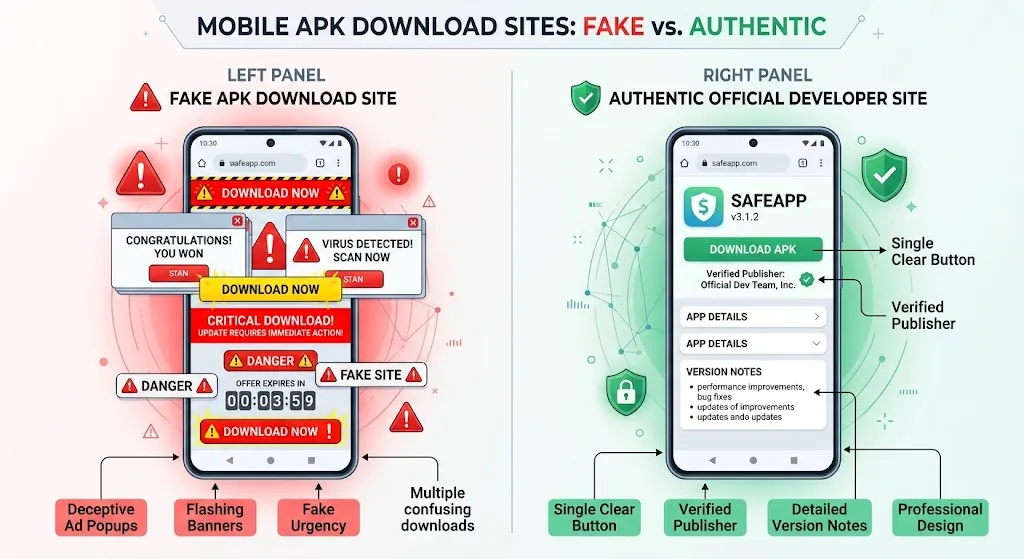
Check the Official Domain
Always check the domain name in your browser address bar. Threat actors build lookalike domains that mimic established gaming brands down to the color palette, logos, and typography.
Inspect the Uniform Resource Identifier (URI) closely. Look for character substitutions (like using an uppercase I instead of a lowercasel, or substituting numbers for vowels). Legitimate operators invest in standard Top-Level Domains (.com, verified local ccTLDs, or well-established corporate extensions) and maintain valid, trusted Transport Layer Security (TLS) certificates without browser security warnings. If your mobile browser flags an SSL/TLS certificate mismatch, exit the page immediately.
Check the Publisher and App Information
Legitimate distribution platforms provide clear technical documentation alongside their application download links. Look for:
- The officially registered developer or corporate entity name.
- The exact version build number (e.g., v4.2.1).
- The compressed file size in megabytes (MB).
- The release or last-updated date.
- A published cryptographic checksum (such as a SHA-256 hash).
If a website provides an APK file without disclosing the version number or technical requirements, treat that file with suspicion.
Avoid Unofficial APK Mirrors When Possible
Independent third-party APK libraries serve a purpose for general utility apps, but real-money gaming software requires stricter caution. Unofficial mirror sites frequently repackage files with their own analytics libraries, in-house ad wrappers, or altered signature certificates.
Unless a third-party repository provides cryptographically verified signatures matched to the original developer, bypass mirror sites entirely. Obtain the installer directly from the primary platform’s verified portal.
How to Verify an APK casino Before Installing It
The smartest security measure you can take is to verify an APK before installing it on your phone. Once you tap “Install” and grant system permissions, containing a malicious payload becomes much harder. Complete this verification while the file sits inert in your storage directory.
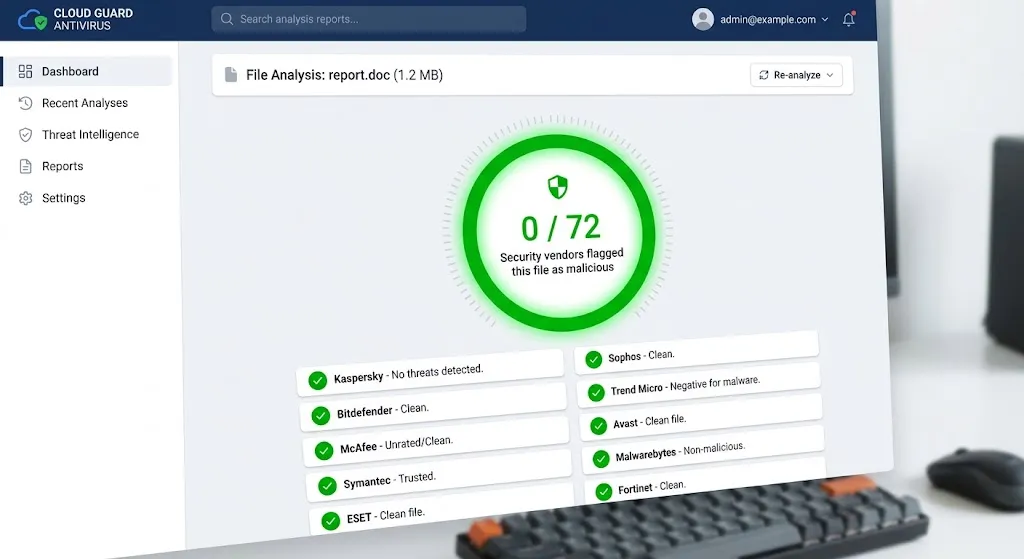
Scan the APK for Malware
Never open an APK immediately after your browser finishes downloading it. Instead, take advantage of centralized multi-engine scanning tools.
- Open your mobile browser and navigate to an established online scanning engine like VirusTotal.
- Select the File tab and upload your downloaded
.apkpackage. - Wait for the platform to analyze the binary against 60+ commercial antivirus engines.
- Review the compiled security report.
If multiple reputable security vendors flag the file with classifications such as Trojan, Adware, or Riskware, delete the file from your phone immediately. Legitimate casino packages should return a clean score or, at most, an isolated false positive from an obscure heuristics engine.
To run APK SHA-256 verification on Android:
- Download an open-source hash calculator from Google Play (such as Hash Checker).
- Select your downloaded casino APK inside the app.
- Generate the SHA-256 string.
- Compare the output string character-by-character with the hash listed on the official source. If even one character differs, do not run the installer.
Compare the APK Signature
Android security relies heavily on application signing. Every legitimate Android application must be digitally signed with a cryptographic certificate held by the original developer.
When an attacker tampers with an APK to insert malware, they cannot duplicate the developer’s private signing key. They are forced to re-sign the app with their own unauthorized certificate. By inspecting the package certificate using tools like ClassyShark3x or InviZible Pro, you can verify that the signature certificate details match the official publisher identity rather than an anonymous third-party signer. This APK signature verification step prevents you from falling victim to repackaged clones.
Verify the APK Version
Before installation, inspect the file properties inside your Android file manager:
- Compare the version string inside the installer against the version announced on the official site.
- Confirm that the package size corresponds to the developer’s stated download size (a 5 MB file labeled as a full-featured live dealer casino suite is an obvious red flag).
- Reject packages showing older version numbers when a secure, updated version is available.
How to Enable APK Installation on Android
Modern versions of Android no longer rely on a universal “Allow Unknown Sources” master toggle. Instead, Android isolates sideloading permissions per application, giving you finer control over which apps can launch installers. Adjust these settings carefully through your native Android Security Settings. For a deeper breakdown of this format, see our beginner guide on How to Enable Unknown Sources on Android
Android 8 and Newer
Since Android 8.0 (Oreo) and through contemporary versions (Android 14, 15, and 16), permission to install unknown apps is granted individually to the program you use to download or manage files:
- Open your device Settings.
- Navigate to Apps (or Apps & Notifications).
- Tap Special App Access (often found under Advanced or via the three dots menu).
- Select Install unknown apps.
- Locate the browser you used to retrieve the file (e.g., Google Chrome) or your local file explorer (e.g., Files by Google).
- Toggle the slider labeled Allow from this source to the On position.
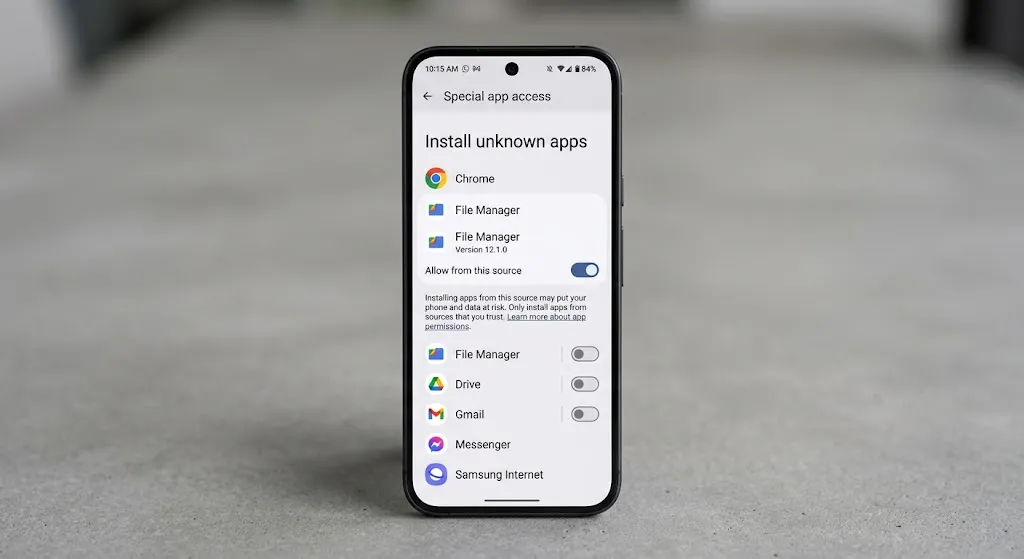
Samsung, Xiaomi, Google Pixel and Other Android Phones
Different smartphone manufacturers customize their Android menu layouts, which changes how you reach this setting:
- Samsung (One UI): Go to Settings > Security and privacy > Install unknown apps. Select your browser or My Files app, then toggle the permission on.
- Xiaomi / Redmi (MIUI / HyperOS): Go to Settings > Protection & Privacy > Special Permissions > Install unknown apps. Xiaomi devices display a mandatory 10-second security warning screen; review the countdown and confirm to proceed.
- Google Pixel / Stock Android: Go to Settings > Apps > Special app access > Install unknown apps, then authorize the specific source app.
Turn the Permission Off After Installation
Leaving sideloading permissions active indefinitely exposes your device to drive-by app installations if you accidentally tap a malicious prompt in the future.
Once your legitimate application finishes installing, revisit the Install unknown apps menu immediately. Find the browser or file manager you authorized and switch the toggle back to Disabled. The installed app will continue to run normally, but your device will be protected against unauthorized background installations.
How to Install a Casino APK Step by Step
Follow this standardized safe casino APK download and deployment workflow to install your software safely:
Step 1 — Download the APK
Visit the verified platform domain using your mobile browser. Tap the direct download button for the Android installer. Pay close attention to the browser prompt at the bottom of your display. Note the exact file name and verify that the file extension is .apk, not .xapk, .apk.exe, or .zip.
Step 2 — Verify the APK
Do not tap the completion alert to open the file right away. Open your file manager, navigate to your Downloads folder, and upload the file to an online scanner or use a local hash verification tool. Confirm that the SHA-256 hash matches the developer’s published checksum and that antivirus engines report zero detections.
Step 3 — Allow Installation From the Required Source
If you haven’t authorized your file manager yet, trigger the system configuration prompt:
- Tap the verified
.apkfile. - A prompt will inform you: “For your security, your phone is not allowed to install unknown apps from this source.”
- Tap Settings directly inside the alert window.
- Toggle Allow from this source to enabled, then tap the back button once.
Step 4 — Install the APK
Android will now present the installation interface showing the app name, icon, and an explicit prompt: “Do you want to install this app?” Review the presented icon and app title. If everything matches the developer’s official branding, tap Install. Allow the system installer a few seconds to unpack and run the package integrity checks.
Step 5 — Review Permissions
Once the installation finishes, tap Done rather than immediately opening the app. Locate the newly installed application icon on your home screen or app drawer:
- Long-press the app icon and tap App Info (the small “i” icon).
- Tap Permissions.
- Review which permissions are granted by default. Revoke access to sensitive hardware that a gaming app does not need, such as your SMS inbox, Call Logs, Contacts, and Physical Location.
Step 6 — Disable Unknown-App Installation
Return to your system Settings, search for Install unknown apps, and toggle off sideloading permissions for both your browser and your file manager.
Review our comprehensive guide on Top 6 Reasons Android Shows ‘App Not Installed’ & How to Fix Them for deeper source-vetting methodologies.
How to Tell If a Casino APK Is Fake
Threat actors often rely on brand recognition to deceive users into installing rogue software. Spotting these attacks requires evaluating the distribution site alongside the binary package itself.
Website Warning Signs
Unknown download portals usually show several structural red flags:
- Unrelated Content Hosts: An app claiming to be an authentic casino installer hosted on a compromised sub-page of an unrelated site (such as an educational blog or an e-commerce storefront).
- Aggressive Timers and Pop-ups: Fake landing pages frequently employ artificial urgency tactics (e.g., “Your version will expire in 2 minutes! Download updated APK immediately”).
- Missing Legal & Responsible Gaming Pages: Genuine international operators display clear licensing details, customer care channels, and terms of service. Fake distribution sites omit these pages or link to nonfunctional
#anchor tags.
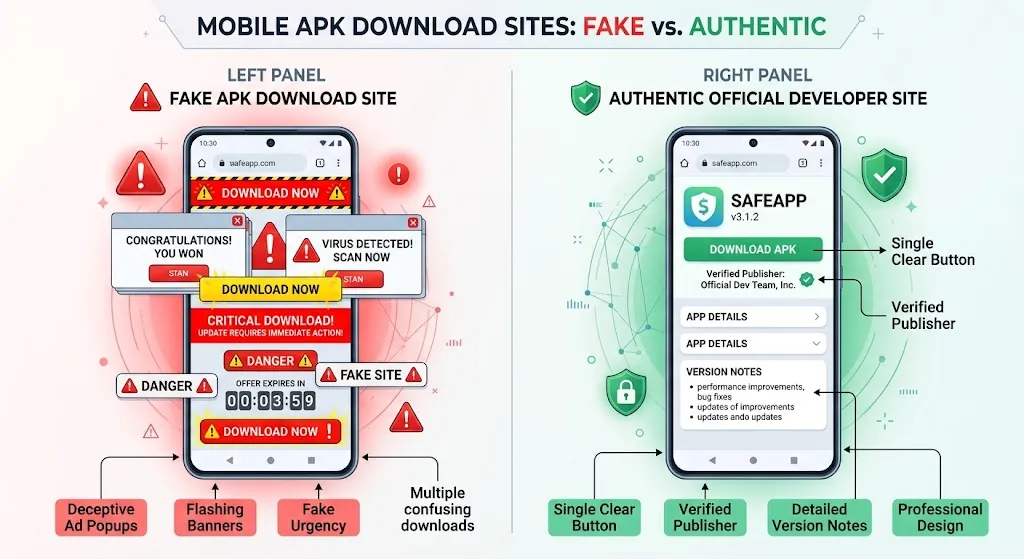
APK Warning Signs
A counterfeit APK usually reveals its true nature through its build metadata:
- Generic or Mismatched App Icons: The app icon appears pixelated, stretched, or displays an outdated logo variant.
- Anomalous File Size: Authentic mobile casino applications bundled with graphics, audio, and network engines generally measure between 30 MB and 90 MB. A package that is under 3 MB is often a malicious stub installer designed to fetch secondary payloads.
- Demands for Accessibility Services: If a newly installed gaming app asks you to enable Android’s Accessibility Service, do not allow it. Banking trojans routinely abuse Accessibility features to read screen contents, capture one-time passcodes, and log keystrokes.
What to Do If You Already Installed a Suspicious APK
If you realize an installed APK is suspect, act quickly to contain the exposure:
[ Disconnect Network ] ──► [ Boot Safe Mode ] ──► [ Uninstall App ] ──► [ Run Play Protect ] ──► [ Reset Passwords ]
- Disconnect Immediately: Switch on Airplane Mode to terminate active data connections, cutting off external communication with command-and-control servers.
- Uninstall the Application: Navigate to Settings > Apps, locate the suspicious app, tap Force Stop, and then select Uninstall.
- Boot into Safe Mode (if needed): If the app hid its launcher icon or prevents uninstallation by intercepting touch inputs, restart your phone in Android Safe Mode (which prevents third-party software from launching) and uninstall it there.
- Run Play Protect & Antivirus: Open the Google Play Store, tap your profile avatar, select Play Protect, and tap Scan. Run a secondary scan using a reputable mobile security tool from a major vendor.
- Review System Permissions: Check Settings > Security > Device admin apps. Revoke privileges from any app you do not recognize.
- Secure Accounts: From a separate, clean device, change the passwords for your email accounts, financial services, and mobile wallets. Monitor bank statements and mobile balances closely for unauthorized activity.
Common Problems When Installing APKs
Manual sideloading occasionally runs into technical errors. Here is how to diagnose and resolve the most frequent installation roadblocks:
“App Not Installed”
This broad error message appears when Android aborts the installation. Common causes include:
- Package Name Conflict: An older or conflicting version of the app is already installed. Uninstall the existing version before sideloading the updated build.
- Insufficient Storage Capacity: Android requires free operational overhead beyond the base file size to extract assets. Free up at least 500 MB of internal storage space.
- Corrupted Download: Packet drops during download can break the archive. Delete the file and download it again over a stable Wi-Fi connection.
Review our comprehensive guide on 6 Reasons Android Shows ‘App Not Installed’ & How to Fix Them
“Parse Error”
The “There was a problem parsing the package” notification indicates that the system’s package parser failed to read the manifest file:
- Incompatible Android OS Version: The APK’s minimum API level requires a newer Android version than your device is running.
- Incompatible Processor Architecture: You downloaded a package compiled exclusively for 64-bit chipsets (arm64-v8a) onto an older 32-bit (armeabi-v7a) device, or vice versa. Download the universal or architecture-compatible APK build.
- Incomplete File: The installer was interrupted before finishing the download.
APK Downloaded but Will Not Open
If your device fails to recognize what to do when you tap an APK file:
- Mismatched File Extension: Certain browsers mistakenly append
.binor.zipto APK files. Rename the file in your file explorer to ensure it ends cleanly with.apk. - Missing MIME-Type Association: Your default file viewer may lack the handler to trigger Android’s Package Installer. Download a standardized file manager (such as Files by Google) and open the file from there.
Installation Is Blocked
If your system actively prevents installation with an alert reading “Blocked by Play Protect” or “Blocked by Device Administrator”:
- Play Protect Warnings: When an unverified developer certificate is encountered, Play Protect shows an alert. Tap More details to review the specific risk classification. Only tap “Install anyway” if you have verified the file’s SHA-256 hash and malware scan results.
- Enterprise or Work Profiles: Managed company devices or parental control frameworks often lock down the sideloading framework entirely. Sideloading cannot proceed under these restricted device profiles.
Casino APK Safety Checklist
Use this quick-reference checklist to confirm the security of any package before allowing it onto your Android device:
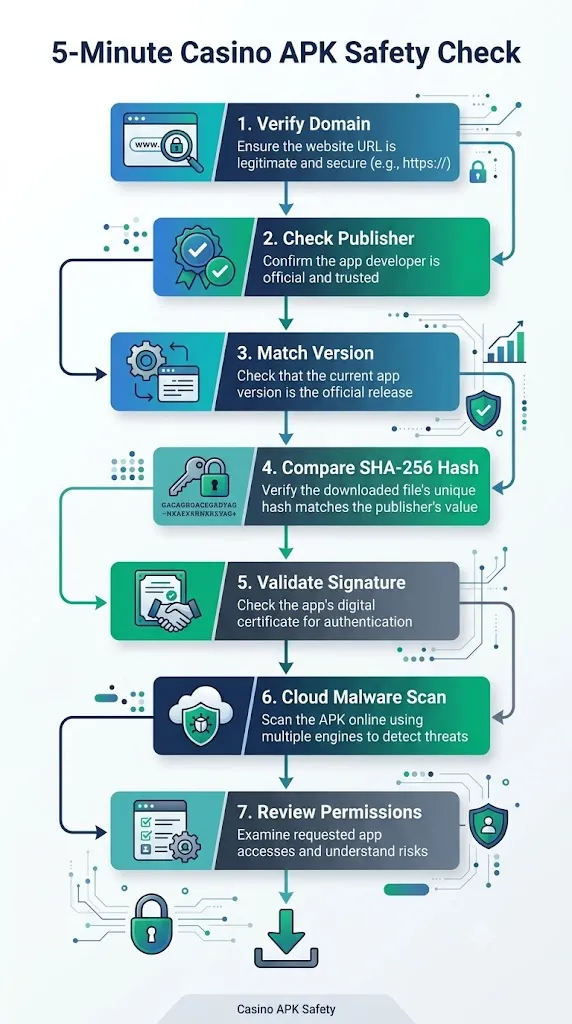
| Inspection Area | Critical Verification Factor | Target Confirmation |
|---|---|---|
| Domain Safety | Host URL and address bar syntax | Valid TLS certificate, exact spelling, no redirection loops. |
| Publisher Legitimacy | Verifiable developer information | Clear corporate entity, visible contact info, official website. |
| Version Consistency | Stated build number vs. file details | Internal manifest metadata matches the publisher’s release notes. |
| SHA-256 Hash | Cryptographic binary checksum | Local file hash matches the developer’s published string exactly. |
| Code Signature | Digital APK signing certificate | The signing certificate belongs to the developer, not a generic key. |
| Malware Analysis | VirusTotal multi-engine scan | Clean report with zero critical detections from major security vendors. |
| Requested Permissions | Android security manifest prompts | Restricted strictly to core functions; no access to SMS, Calls, or Accessibility. |
| Installation Source | Android permission controls | Granted temporarily to a single app, not enabled system-wide. |
| Post-Install Cleanup | Sideloading permission toggles | “Install unknown apps” permission turned off immediately after installation. |
Frequently Asked Questions About Casino APKs in Pakistan
What is a casino APK?
A casino APK is a standalone Android installation package used to set up a real-money gaming application outside the Google Play Store. It packages all the code, assets, audio files, and security certificates necessary for the application to function on your phone.
How do I install a casino APK on Android in Pakistan?
To install a casino APK, download the file from the official developer site, verify its integrity with a malware scan, and open your Android settings to allow installations from your browser or file manager. Tap the file to install it, then turn off the installation permission afterward.
Are APK files safe to download?
APK files are safe to download if they come directly from an official publisher, remain unmodified, and pass a malware scan. However, downloading APKs from untrusted third-party mirrors carries risks of malware, credential theft, and modified application code.
How can I tell if a casino APK is fake?
You can identify a fake casino APK by checking for mismatched file sizes, suspicious developer certificates, missing official branding, or aggressive demands for sensitive system access like SMS and Accessibility services. Scanning the file on VirusTotal will also uncover hidden adware or trojans.
How do I verify an APK SHA-256 hash?
To verify an APK SHA-256 hash, use an Android hash calculation utility to generate the checksum of your downloaded file. Then, compare that string character-by-character against the official hash provided on the developer’s download portal. If the strings match, the file is authentic and unaltered.
How can I check whether an APK contains malware?
You can check an APK for malware by uploading the package to VirusTotal.com before opening it on your device. The platform analyzes the file using dozens of major antivirus engines and provides a comprehensive threat report within seconds.
How do I enable installation from unknown sources on Android?
To enable installation on modern Android versions, open Settings > Apps > Special app access > Install unknown apps. Select the browser or file manager containing your APK and toggle Allow from this source to enabled.
Why does Android say “App not installed” when installing an APK?
Android shows an “App not installed” error when there is an existing app conflict, insufficient storage space, a corrupt download, or an incompatible operating system version. Resolving the conflict, freeing up storage, or redownloading the file usually fixes the problem.
Should I disable “Install unknown apps” after installing an APK?
Yes, you should always disable the “Install unknown apps” permission immediately after installation. Turning off this permission prevents unauthorized applications or compromised websites from silently pushing secondary files onto your device in the background.
What should I do if I installed a suspicious APK?
If you installed a suspicious APK, disconnect your device from the internet immediately, uninstall the application via Android Settings, and run a full security scan with Google Play Protect. Change your account passwords and financial credentials from a separate, clean device.
Final Thoughts: Protecting Your Device
Managing manual app installations requires a security-first approach. While getting a casino APK Pakistan 2026 build up and running takes just a few taps, prioritizing source verification prevents identity theft and malware infections. Always verify the domain, inspect the cryptographic SHA-256 hash, and treat third-party download mirrors with caution. Never bypass Android’s built-in security protections without thoroughly vetting the file first.
Take a moment to audit your device today: open your Special App Access settings, revoke lingering unknown-installation privileges from your browsers and messaging apps, and keep your mobile operating system updated with the latest security patches.