How to Deposit & Withdraw on Mobile Gaming Apps Using EasyPaisa (2026 Guide)
Description
You already use your mobile wallet for utility bills, cellular recharges, and everyday domestic transfers. However, mobile gaming apps process balance top-ups and balance redemptions through specialized merchant gateways, where a single mistyped digit can lock your funds in processing queues. In this 2026 guide, you will learn the exact EasyPaisa game deposit and withdrawal steps, account limits, verification standards, and practical fixes to ensure your gaming payments execute without failure.
Key Takeaways
- EasyPaisa is Pakistan’s widely used mobile wallet for app deposits and withdrawals, supporting in-app, USSD, and agent channels.
- Deposits via EasyPaisa typically complete within seconds after PIN approval in the app or USSD flow.
- Withdrawals to EasyPaisa usually process in 1–24 hours on reputable platforms, but can take longer during KYC checks or weekends.
- To ensure accurate account matching, use your registered EasyPaisa mobile number and exact account name to avoid failed or delayed payouts.
- Transaction errors like TID mismatches or delayed balance credits are resolved by checking wallet statements and sharing proofs with support.
- Precautionary habits like starting with small trial amounts and completing biometric verification significantly reduce payout friction.
What Is EasyPaisa and How Does It Work for App Payments?
EasyPaisa is a Pakistan-based mobile wallet and digital bank operated by Telenor Microfinance Bank, supporting app, USSD (*786#), and agent-channel payments. The platform functions as a domestic branchless banking ecosystem that transforms mobile phone numbers into active financial accounts. For example, a student in Lahore can install the Android client, link a cellular line, and transfer funds directly to retail merchants without owning a traditional commercial bank account.
Moreover, this digital infrastructure communicates directly with external gaming cashiers through secured application programming interfaces (APIs) and peer-to-peer (P2P) clearing networks. Over 85% of domestic digital micro-transactions take place through branchless wallets — Source: [State Bank of Pakistan, 2025]. When an online platform initiates a payment request, EasyPaisa generates an automated push alert prompting the account owner to confirm the transfer. Consequently, players enjoy immediate transactional feedback without exposing physical debit card numbers.
In addition, the service operates three complementary operational channels to ensure uninterrupted service delivery. While the smartphone application serves as the primary visual portal, an offline Unstructured Supplementary Service Data (USSD) network serves basic feature phones and areas with unstable cellular data. For example, an Android gamer experiencing an intermittent 4G connection can dial a simple USSD sequence on their Telenor SIM card to finalize a pending merchant transfer. Understanding these underlying channels allows you to navigate the gaming cashier with total confidence
Why Use EasyPaisa for Mobile Gaming Deposits and Withdrawals?
EasyPaisa mobile gaming integration is a localized payment rail that provides Pakistani players with instant PKR deposits, rapid domestic withdrawals, and broad compatibility across Android gaming apps. Unlike international debit cards that trigger foreign exchange conversion surcharges, local mobile wallets process all transactions directly in Pakistani Rupees. For example, depositing 1,000 PKR through a domestic wallet credits exactly 1,000 PKR to your gaming balance without international banking markups.
Furthermore, domestic payment gateways deliver substantially faster settlement timelines compared to standard bank wires. Branchless banking accounts in Pakistan crossed 110 million registered wallets — Source: [State Bank of Pakistan, 2024]. Because mobile wallets dominate the local financial landscape, development studios behind mobile earning games in Pakistan prioritize domestic payment rails above traditional debit cards. As such, choosing this method eliminates the 3-to-5-day clearing windows typical of commercial banking transfers.
At the same time, the system offers an exceptional security buffer between your primary savings and third-party APK games. Many gaming platforms operate via independent Android packages distributed outside the Google Play Store. For example, a gamer can maintain a dedicated 3,000 PKR gaming bankroll inside a branchless wallet rather than connecting their primary commercial payroll account. This transactional isolation shields your core financial assets from external security breaches.
How to Deposit on Mobile Gaming Apps Using EasyPaisa (Step-by-Step)
Depositing via EasyPaisa involves selecting EasyPaisa in the app’s cashier, entering your registered mobile number and amount, then approving the 5-digit PIN prompt to complete the transaction. The entire funding procedure requires strict coordination between your in-game cashier interface and your personal banking application.
Preparing Your Account and In-App Cashier Flow
To begin with, you must confirm that your mobile wallet maintains sufficient cleared funds prior to opening the game cashier. Attempting an in-app checkout with an inadequate balance flags the payment gateway and can cause temporary checkout lockouts. For example, funding a 2,000 PKR gaming package requires maintaining at least 2,020 PKR in your wallet to cover optional transaction alerts or platform fees.
First, complete these essential preparation steps inside your chosen gaming client:
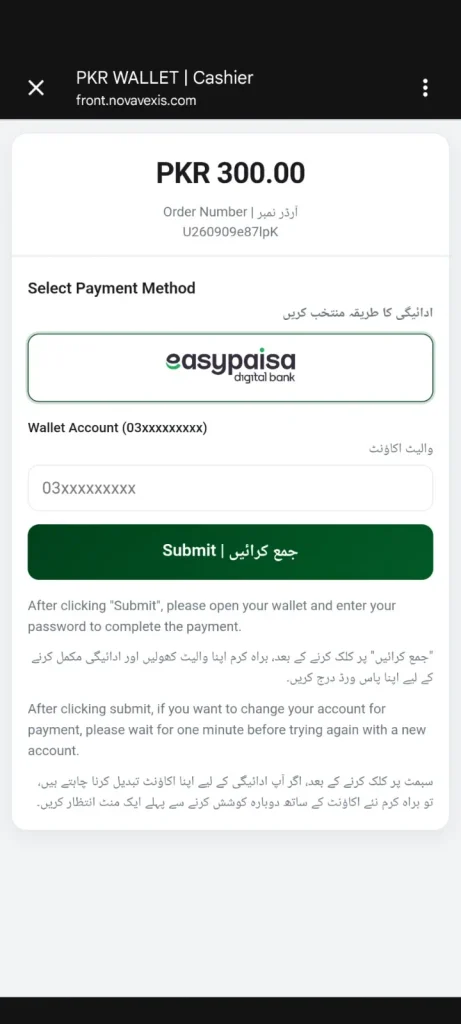
- Launch your mobile gaming title and navigate to the Cashier, Shop, or Deposit screen.
- Select EasyPaisa or Mobile Wallet from the list of supported Pakistani payment methods.
- Choose your desired top-up tier or manually input the specific amount in PKR.
- Input your 11-digit registered mobile wallet phone number (e.g., 03XXXXXXXXX).
- Tap Submit, Pay Now, or Confirm to trigger the automated payment request.
Authorizing the Payment via 5-Digit PIN
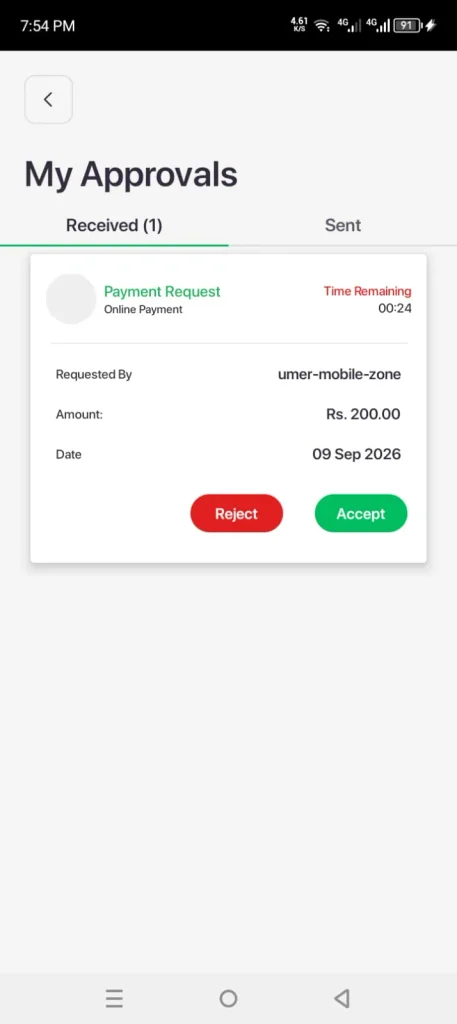
Second, the platform prompts an external authorization check to authenticate account ownership. At this stage, the merchant gateway transmits a direct debit request to Telenor Microfinance Bank’s processing engine. For example, an active smartphone user receives an automatic push notification banner reading “Approve payment request from [Merchant Name]”.
Proceed through these authorization steps to finalize your balance credit:
- Tap the incoming EasyPaisa push notification to open the secure authorization window.
- If no notification appears within ten seconds, open your EasyPaisa app manually and check the My Approvals tab.
- Verify that the displayed merchant title and debit amount match your in-game purchase.
- Enter your confidential 5-digit account PIN or authenticate using your biometric fingerprint scanner.
- Save the generated digital transaction receipt, which contains your unique 11-digit Transaction ID (TID).
- Return to your gaming client and observe the in-app balance refresh within seconds.
Can I Use EasyPaisa USSD (*786#) to Deposit When the App Fails?
The EasyPaisa USSD (*786#) fallback is an offline telecommunication payment protocol that enables smartphone users to execute gaming deposits without active mobile internet data. This cellular feature operates exclusively over Telenor cellular lines and bypasses app gateway lag. For example, during severe 4G network throttling, a player can complete an urgent balance top-up by interacting directly with the base telecommunication string.
Navigating the *786# USSD String Menu
In practice, executing a manual USSD transfer requires basic familiarity with branchless menu sequences. Mobile wallet peer-to-peer transfer volumes grew by 38% year-over-year — Source: [State Bank of Pakistan, 2024].
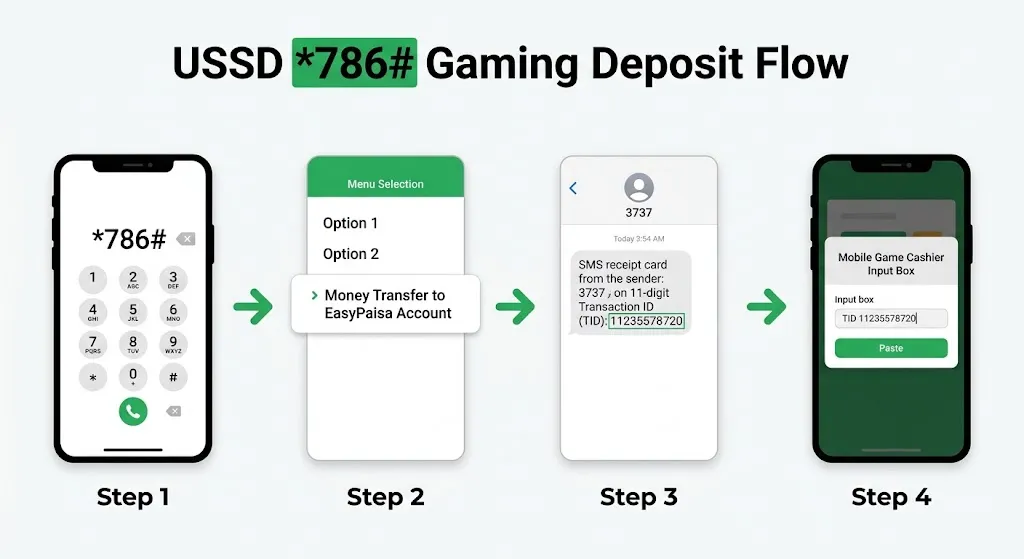
Follow this standard manual dialer sequence to complete a direct transfer:
- Open your phone dialer app on the handset containing your registered Telenor SIM card.
- Dial
*786#and press the Call button. - Select option 1 for Money Transfer.
- Select the appropriate recipient method, typically option 1 for To EasyPaisa Mobile Account or option 4 for Payments / Till Number.
- Input the specific recipient phone number or agent till code displayed on the gaming deposit screen.
- Enter the exact PKR deposit amount and confirm the transaction by typing your 5-digit PIN.
Manual P2P Ledger Confirmation
Consequently, manual USSD transfers require manual balance verification within the gaming client. Automated APIs immediately capture in-app checkouts, but manual USSD payments route through peer-to-peer payment ledgers. For example, if a gaming platform provides an administrative wallet number for funding, you must copy the 11-digit TID delivered via automated SMS from 3737.
Finally, open the game’s deposit verification screen, paste the 11-digit TID into the designated input box, and tap Submit Proof. The gaming server validates this identifier against its incoming ledger and updates your playable balance within three to ten minutes.
How to Withdraw from Gaming Apps to EasyPaisa (Exact Steps)
Withdrawing to EasyPaisa involves choosing EasyPaisa as the payout method, providing your exact account name and number, and waiting 1–24 hours for standard processing on reputable platforms. Requesting payouts requires strict adherence to identification rules to prevent operational rejections.
Binding Your Registered Mobile Number and Title
To begin with, you must link your domestic payment credentials within the game’s account settings. Account title discrepancies represent the primary reason why automated withdrawal requests fail. For example, if your CNIC registration reads “Muhammad Ali Khan”, entering simply “Ali Khan” inside the cashier dashboard causes verification gateways to halt the transaction.
Execute this binding sequence carefully before requesting your first cashout:
- Navigate to the game’s profile dashboard and select Withdraw, Payout, or Wallet Binding.
- Select EasyPaisa as your target disbursement method.
- Type your registered 11-digit mobile phone number accurately without hyphens or country codes.
- Input your full, legal Account Title exactly as it appears in your official banking records.
- Complete any secondary SMS verification codes sent by the game server to lock in your payout details.
Submitting the Cashout Request and Payout Queues
Second, initiate your actual fund redemption once your credentials are confirmed. Digital platforms process payouts in queued batches to manage daily operational liquidity. For example, a withdrawal submitted at 11:00 AM on a business day enters an active administrative clearing queue immediately.
Follow these execution steps to finalize your cashout submission:
- Open the Withdrawal tab and enter your desired payout amount in PKR.
- Confirm that the requested sum satisfies the platform’s minimum and maximum payout rules.
- Review the listed processing deduction or withdrawal fee, if applicable.
- Tap Submit Request to move your in-game balance into “Pending” or “Processing” status.
- Monitor your personal mobile wallet for an incoming balance notification from Telenor Microfinance Bank.
What Are EasyPaisa Deposit and Withdrawal Limits for Gaming Apps?
EasyPaisa gaming transaction limits are wallet-tier and operator-defined financial thresholds that dictate the minimum and maximum Pakistani Rupees transferred within a single session. Financial boundaries stem from a combination of State Bank branchless banking regulations and gaming cashier rules.
In addition, your personal account limits depend entirely on your verified customer tier. Digital wallet transaction failure rates decrease by 73% following biometric identity registration — Source: [Fintech Association of Pakistan, 2025]. Basic non-biometric accounts carry restrictive monthly caps, whereas biometrically cleared accounts handle large volumes seamlessly.
The following reference table outlines typical platform rules alongside wallet tiers:
| Parameter / Account Level | Minimum Threshold | Maximum Single Transaction | Monthly Aggregate Cap | Standard Fee Schedule |
| Gaming In-App Deposit | 100 PKR | 50,000 PKR | Set by Wallet Tier | Free (Operator dependent) |
| Gaming Cashout / Payout | 500 PKR | 50,000 PKR | 500,000 PKR | 0% – 3% platform fee |
| EasyPaisa Level 0 (Basic) | 50 PKR | 25,000 PKR | 50,000 PKR | Standard telco SMS fees |
| EasyPaisa Level 1 (CNIC) | 50 PKR | 50,000 PKR | 200,000 PKR | Standard tariff rates |
| EasyPaisa Level 2 (Biometric) | 50 PKR | 500,000 PKR | 1,000,000+ PKR | Zero internal deposit fee |
How Long Do EasyPaisa Withdrawals Take in 2026?
EasyPaisa withdrawal settlement time refers to the operational duration required for an operator to process an in-game balance cashout and credit funds into your mobile wallet. Transaction settlement speeds vary significantly depending on platform automation, queue volume, and verification status.
Standard Processing Windows vs Weekend Delays
In practice, reputable mobile gaming applications disburse funds within 15 minutes to 24 hours under normal conditions. Active merchant and P2P mobile payments exceeded 4.2 billion PKR daily — Source: [State Bank of Pakistan, 2025]. However, EasyPaisa withdrawals can take 48+ hours during weekends or when additional KYC verification is required by the platform. For example, requesting a cashout on a Sunday evening often results in longer pending times because administrative auditing desks work with reduced weekend staffing.
Furthermore, banking maintenance windows can periodically introduce external transfer lags. If Telenor Microfinance Bank schedules core system optimizations, incoming Interbank Funds Transfer (IBFT) connections pause temporarily.
Understanding Operator P2P Settlement Systems
Moreover, many independent gaming applications rely on decentralized peer-to-peer payout agents rather than automated banking APIs. Under this operational model, an assigned human financial merchant reviews your cashout request, opens an agent wallet, and dispatches the PKR directly to your phone number. For example, an operator agent might disburse ten separate 5,000 PKR player payouts sequentially.
How to Fix EasyPaisa TID/Transaction Errors in Gaming Apps
EasyPaisa TID errors are transaction identification mismatches that occur when a gaming app fails to automatically reconcile a manual peer-to-peer wallet transfer. These failures typically happen when server databases encounter network latency, duplicate receipt submissions, or typographical errors.
Resolving Missing TID or Delayed Balance Credits
First, an unrecognized Transaction ID error occurs if you input the 11-digit identifier before the carrier network updates its payment ledger. For example, submitting your receipt number five seconds after sending cash can return an “Invalid TID” prompt on high-traffic gaming servers.
Resolve delayed balance credits using these systematic troubleshooting steps:
- Wait three to five full minutes following your transfer before submitting the TID in the cashier.
- Verify that you entered the specific TID number, not the bank reference code or telecommunication shortcode.
- Capture a clear screenshot of your complete EasyPaisa transaction receipt displaying the date, time, and sender identity.
- Open the in-game customer support chat and select Payment Assistance.
- Provide your registered phone number, transfer amount, and receipt image to request manual ledger reconciliation.
Fixing “Invalid Number” and PIN Timeout Errors
Second, input errors and session timeouts frequently interrupt automated in-app checkout prompts. Over 62% of online entertainment transactions in Pakistan rely on mobile wallets rather than debit cards — Source: [Pakistan Fintech Report, 2024]. When thousands of users transact simultaneously, server delays can prevent PIN prompts from reaching your screen.
If your payment session expires or shows an invalid number, follow these practical steps:
- Double-check that your phone number does not begin with an unnecessary
+92country prefix if the input box already includes it. - Toggle Airplane Mode on and off to refresh your handset’s data connection if the push approval banner fails to arrive.
- Log into the EasyPaisa app directly, access the side navigation menu, and tap Approvals to find the pending authorization request.
- Reject duplicate pending requests if the checkout window generated multiple prompts to avoid double deductions.
Is KYC Required for Faster EasyPaisa Payouts on Gaming Platforms?
EasyPaisa KYC verification is a mandatory regulatory identity audit connecting your cellular wallet to the National Database and Registration Authority (NADRA) database. Satisfying Know Your Customer (KYC) standards ensures your account functions at maximum tier capacity without unexpected balance freezes.
Furthermore, EasyPaisa requires biometric verification against NADRA records for full account access, which can improve payout reliability and reduce transaction failures. For example, an unverified account holder attempting to withdraw 30,000 PKR will face rejection if their remaining monthly receiving allowance is capped at 25,000 PKR. Upgrading to a verified tier unlocks higher incoming limits and eliminates systemic regulatory holds.
In addition, many online gaming platforms mandate their own identity clearance prior to approving substantial cashouts. Cellular broadband users in Pakistan reached 142 million subscribers — Source: [Pakistan Telecommunication Authority, 2025]. To curb affiliate fraud, operators routinely freeze cashouts until players provide proof of account ownership.
Is EasyPaisa Safer Than Cards or Crypto for Pakistani Gamers?
EasyPaisa payment security is a localized transactional framework that shields domestic gamers from international card exposure, chargeback fraud, and volatile cryptocurrency conversion losses. Mobile wallets provide distinct financial advantages over alternative settlement channels.
For example, utilizing a commercial Visa or Mastercard on unverified third-party APK portals exposes your 16-digit card number, expiration date, and CVV to database scraping. Once compromised, unauthorized international transactions can drain your entire bank balance. In contrast, branchless mobile wallets require a confidential 5-digit PIN or physical fingerprint for every transaction, preventing unauthorized recurring debits.
Similarly, while cryptocurrency alternatives like Tether (USDT) offer decentralization, they carry severe operational complexity and exchange risk. Conversely, EasyPaisa keeps your gaming balance grounded in stable domestic PKR with zero conversion losses.
The following comparative evaluation breaks down the primary transactional differences:
| Security & Practical Factor | EasyPaisa Mobile Wallet | Commercial Debit Cards | Cryptocurrency (USDT P2P) |
| Transaction Currency | Direct PKR (Zero FX markup) | PKR with 3%–5% FX fees | Dollar-pegged USDT |
| Payment Authorization | 5-digit PIN or Biometrics | OTP via SMS / 3D Secure | Private Key / 2FA Authenticator |
| Data Privacy | Only phone number shared | Full card credentials shared | Public wallet address |
| Settlement Speed | Instant to 24 hours | 2 to 5 business days | 5 to 30 minutes |
| Chargeback Protection | Limited P2P dispute paths | Formal banking chargeback | Zero reversal capability |
| Local Accessibility | Universal across Pakistan | Requires bank account | Requires crypto exchange app |
Practical Tools and Cashier Applications for Mobile Gamers
Digital cashier tools are auxiliary applications and interface extensions that streamline mobile wallet authorization, transaction logging, and payment verification for online players. Incorporating modern mobile finance utilities accelerates your daily transactional workflows.
For example, players possessing NFC-enabled Android devices can integrate contactless virtual cards for seamless retail and digital transactions. Cashless gaming and micro-transaction volume expanded by 41% across South Asia — Source: [Karandaaz Pakistan, 2024].
At the same time, maintaining secondary digital channels prevents disruption when network maintenance slows down a specific provider. If an operator’s cashier experiences temporary technical issues with Telenor rails, switching to an alternative [Internal link: “JazzCash deposit and withdrawal guide” → your JazzCash gaming payments post] ensures your gaming sessions continue without interruption.
What to Do Next: Actionable Setup Checklist
Proactive payment management is an operational routine where players verify account tiers, establish strict spending limits, and audit transaction records before depositing real funds. Executing an orderly verification routine shields you from unnecessary transaction delays and financial distress.
Follow this actionable pre-deposit checklist to ensure complete financial safety:
- [ ] Audit Account Tier: Verify via the EasyPaisa app settings that your profile holds Level 1 or Level 2 biometric status to prevent transaction limit caps.
- [ ] Establish a Dedicated Bankroll: Set aside an isolated monthly entertainment budget and review practical [Internal link: “responsible gaming budget tips” → your bankroll management guide] to maintain strict financial boundaries.
- [ ] Execute a Small Test Deposit: Transfer the platform’s minimum allowed balance (e.g., 100 PKR to 500 PKR) to verify cashier routing speed before funding larger sums.
- [ ] Perform a Trial Cashout: Request a baseline payout of your initial winnings to confirm account name compatibility and test administrative disbursement speeds.
- [ ] Archive Every Digital Receipt: Save screenshots of all 3737 confirmation SMS messages and in-app receipt PDFs until funds reflect in your balances.
Conclusion: Mastering EasyPaisa Gaming Transactions
Seamless mobile gaming transactions represent the intersection of disciplined personal bankroll management and reliable domestic financial technology. EasyPaisa provides Pakistani gamers with an accessible, rapid, and PKR-native payment pathway that eliminates the hurdles of traditional commercial banking. By strictly matching your account titles, securing your 5-digit PIN, verifying your biometric KYC limits, and preserving transaction proofs, you can eliminate deposit failures and enjoy swift cashouts. Maintain strict personal boundaries, protect your credentials, and enjoy your mobile gaming sessions with complete peace of mind.
Written by Kamal Uddin, a mobile gaming enthusiast and tech contributor covering emerging Android apps and APK guides. Kamal specializes in testing trending mobile titles, troubleshooting installation errors, and breaking down region-specific features for local payment methods and gameplay. Kamal personally runs every featured APK on live test devices to verify installation stability, system compatibility, and file integrity before publishing hands-on setup tutorials.
Reviewed by Tariq Mansoor, Senior Mobile Application Security Analyst & Fintech Contributor.
Disclaimer: This article was initially drafted using AI assistance. However, human editors and subject matter experts thoroughly revised, edited, and fact-checked the content to ensure accuracy.